
Most multi-unit operators don’t have a formal pre-season readiness process. They have a general sense of what needs to happen and a reasonable confidence that it’s getting done. That confidence is hard to verify across ten locations. Much harder across fifty.
The problem with informal preparation isn’t intent—it’s that there’s no way to know what’s been missed until volume exposes it. A kiosk that’s not intercepting guest traffic. An upsell sequence that was never updated for the summer. A seasonal hire on the register during a Saturday lunch rush. These aren’t failure-of-effort problems. They’re failure-of-verification problems.
This checklist is built for cross-functional ops and IT teams who want a structured way to confirm readiness across every location before summer traffic peaks. Not a reminder of things to think about—a tool to actually run through, assign by role, and track to completion.
How to Use This Checklist
The items below are organized into two tracks: Operations and Technology. In practice, these aren’t fully separate—a kiosk placement decision is both an ops question and a tech question—but the ownership typically is. Assign the Operations track to your regional ops lead or general manager at each location. Assign the Technology track to your IT or tech lead.
Work through both tracks at each location, not just at the locations you’re most worried about. Peak season performance variance across a portfolio often has less to do with overall brand strength and more to do with which specific locations got the pre-season attention and which didn’t.
The goal isn’t to complete the checklist once at the brand level. It’s to complete it at every location.
Operations Track
Floor and Queue Management
- Walk each location during a high-volume period and map guest flow. Where do guests slow down after entering? Where does the line form when the lobby fills? Where does the ordering process visibly stall? This walk surfaces problems that don’t show up in transaction data—congestion patterns, dead zones, and friction points that only become visible when the space is actually under pressure.
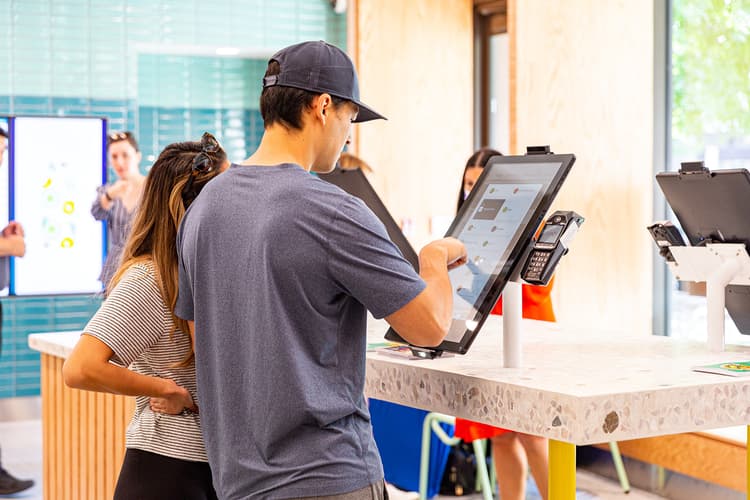
- Confirm kiosk placement intercepts natural guest traffic from the entrance. A kiosk positioned off to the side of the main traffic flow gets ignored regardless of how well it’s configured. The placement question isn’t whether guests can find the kiosk—it’s whether the kiosk is positioned where guests naturally decelerate after entering. That’s where adoption happens. Per Bite’s platform guidance, placement relative to entry traffic patterns is one of the highest-impact variables in kiosk adoption rates.
- Audit signage for ordering flow clarity. Can a first-time guest navigate from entry to order to pickup without asking a staff member for direction? If not, the signage isn’t doing its job. This matters especially during summer, when tourist and non-regular traffic is higher than at any other time of year.
- Confirm queue barriers and lobby management tools are in place and positioned correctly. Queue management infrastructure—barriers, stanchions, floor markers—doesn’t need to be elaborate. It needs to exist and be positioned where congestion actually forms, not where it’s convenient to store it.
Staffing and Role Deployment
- Identify cross-training gaps by role and location. Which critical roles—expo, food running, counter backup—have no cross-trained coverage if someone calls out? Map those gaps now, before volume makes cross-training impractical. With 77% of operators still citing recruiting and retaining employees as a leading challenge, according to the NRA’s 2025 State of the Restaurant Industry report, most operations are heading into summer without the staffing depth they’d prefer. Cross-training is the primary way to build flexibility into a team that may not be at full strength.
- Confirm your seasonal hire deployment plan assigns new staff to lower-stakes roles. New hires have the steepest learning curves and the highest error rates. The register during a summer lunch rush is not the right place for them. Assign seasonal staff to food running, bussing, expo support, and lobby management—roles where execution matters but error consequences are lower.
- Confirm staffing schedules are built against daypart-level transaction data, not last year’s general patterns. Summer volume isn’t uniform. Tourist-adjacent locations see different patterns than commuter corridors. Pull your location-level transaction data by daypart and day of week before setting schedules. Staff for the hard windows, specifically, not for an average week.
Menu and Speed of Service
- Audit your summer LTOs for prep time and volume implications.
A new item that performs well at moderate volume can become a kitchen liability during a peak rush. Before promoting any summer LTO, stress-test its prep time under high-volume conditions. If it can’t come off the line cleanly when the kitchen is at capacity, it shouldn’t be a featured item during your busiest weeks. - Identify items that consistently generate order errors or kitchen confusion. Pull your order accuracy data by item and location. Which modifications generate the most errors? Which items produce the most voids or remakes? Fixing those before summer means fewer disruptions when volume is highest and staff bandwidth is lowest.
Technology Track
Kiosk Configuration
- Review kiosk screen configurations for summer menu alignment.
Are featured slots updated to reflect your summer menu? Are you promoting items that are high-margin and fast to prepare, or items that were configured months ago and never updated? Screen configuration should be treated as an active merchandising decision, not a set-it-and-forget-it setup. - Confirm upsell sequences are configured for daypart context.
A lunch sequence optimized for speed should look different from a dinner sequence optimized for check size. Guests visiting in the evening have more time, are more receptive to premium add-ons, and represent a higher check-size opportunity. Bite’s AI-powered upsell logic matches the right add-on to the right order at the right moment—but only if the underlying configuration reflects your actual daypart strategy. - Audit upsell attachment rates by location and identify underperforming configurations. Which locations are seeing strong check lift and which aren’t? Configuration differences are usually the explanation. Identify the gap before peak season, not after. Bite operators consistently see 20%+ average check lift across their kiosk deployments—locations running significantly below that benchmark are leaving revenue on the table.
- Verify kiosk hardware is serviced and functioning across all locations. A kiosk that goes down during a Saturday lunch rush doesn’t just take an ordering channel offline—it creates lobby congestion, increases counter load, and degrades the guest experience at exactly the moment it matters most. Run a hardware audit at every location before volume peaks. Don’t find out something’s broken when it costs you the most.
Analytics and Visibility
- Confirm analytics access for regional and corporate teams. Who can pull transaction data by location and daypart? If the answer is “only the person who set up the account,” that’s a visibility problem that will limit your ability to make mid-season adjustments. Bite’s Sales and Analytics Dashboard gives corporate and regional teams location-level and item-level data—but access needs to be configured and confirmed before the season starts.
- Establish a mid-season data review cadence. Peak season generates more transaction data than any other period. Build in a scheduled review—weekly or bi-weekly—to check upsell attachment rates, daypart performance, and ticket time trends by location. The operators who come out of summer with better margins aren’t the ones who reviewed the data in September. They’re the ones who acted on it in July.
System Readiness
- Confirm all menu updates are live across every location before summer LTOs launch. Stale kiosk screens—showing last season’s featured items, out-of-date pricing, or removed menu items—erode guest trust and create ordering friction. Verify that menu pushes have propagated correctly to every location, not just the ones you’re watching most closely.
- Monitor and update KOR (Kiosk Order Ready) dashboard alerts.
The lunch rush is going as planned, but at the end of the day, you notice that the number of orders from kiosks dipped 50% from previous days. What caused it? Don’t wait to find out hours later that a kiosk was off or had a software or hardware issue. Bite’s KOR dashboard allows operators to see the status of their kiosks in real-time, allowing them to troubleshoot issues to get back online. Administrators can set up email and sms alerts to get the most up-to-date reporting on the entire kiosk fleet, whether at the store or organization level.
The Brand/Operator Coordination Layer
For franchise systems, summer readiness isn’t just a location-level problem—it’s a coordination problem between brand and operator. Brand designs the menu, sets the technology configuration, and establishes the guardrails. Regional operators own the execution. The gap between those two layers is where peak season problems most reliably live.
This checklist is most effective when it’s completed at the location level and reviewed at the regional level. Where configuration gaps exist—upsell sequences that were never updated, kiosk placement that doesn’t match brand standards, analytics access that hasn’t been provisioned—the fix often requires both parties acting. Flag those items for escalation rather than leaving them to individual location discretion.
As Portillo’s noted in QSR Magazine’s 2025 operator roundup, the impact of “thoughtfully connected systems—from digital menu boards and self-service kiosks” depends on those technologies working together, not in isolation. That integration is a brand-level responsibility. Confirming it’s actually in place at every location is an operator-level one.
Summer rewards preparation. The teams that run through this checklist in May come out of August with better margins, better guest scores, and a clearer picture of where to focus heading into fall.